

Unleash the power of SigningHub in your
own web portal or application
Integrating SigningHub
Ascertia’s SigningHub can be easily integrated into your core business applications using simple, industry-standard REST architectural style APIs. This ensures a seamless experience for your end users, using a range of integration options, to embed document preparation and signing within your own ecosystem.
Simple
Based on REST design while the payload is JSON making parsing quick and simple.
Secure
OAuth 2.0 to authorize client requests. All communication is secured using industry standard HTTPS (TLS 1.2).
Powerful
API automates actions like create package, add documents, apply template, share, download, get status and much more!
Types of Integration
Tight integration
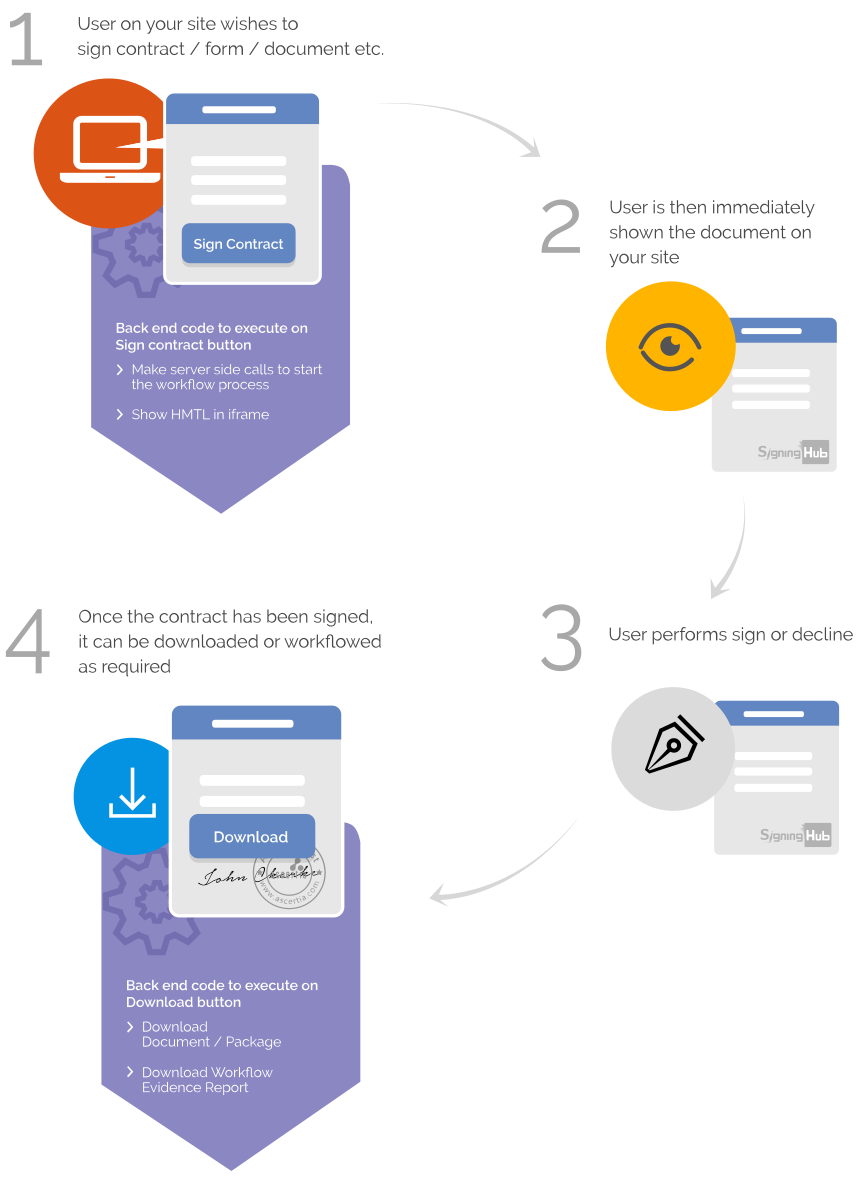
Users interact with the document whilst SigningHub is embedded inside your web application. Users can view the document, fill-in any form fields and create their electronic or digital signature within your site. This creates a simple, efficient and trustworthy experience for the user.
Loose integration
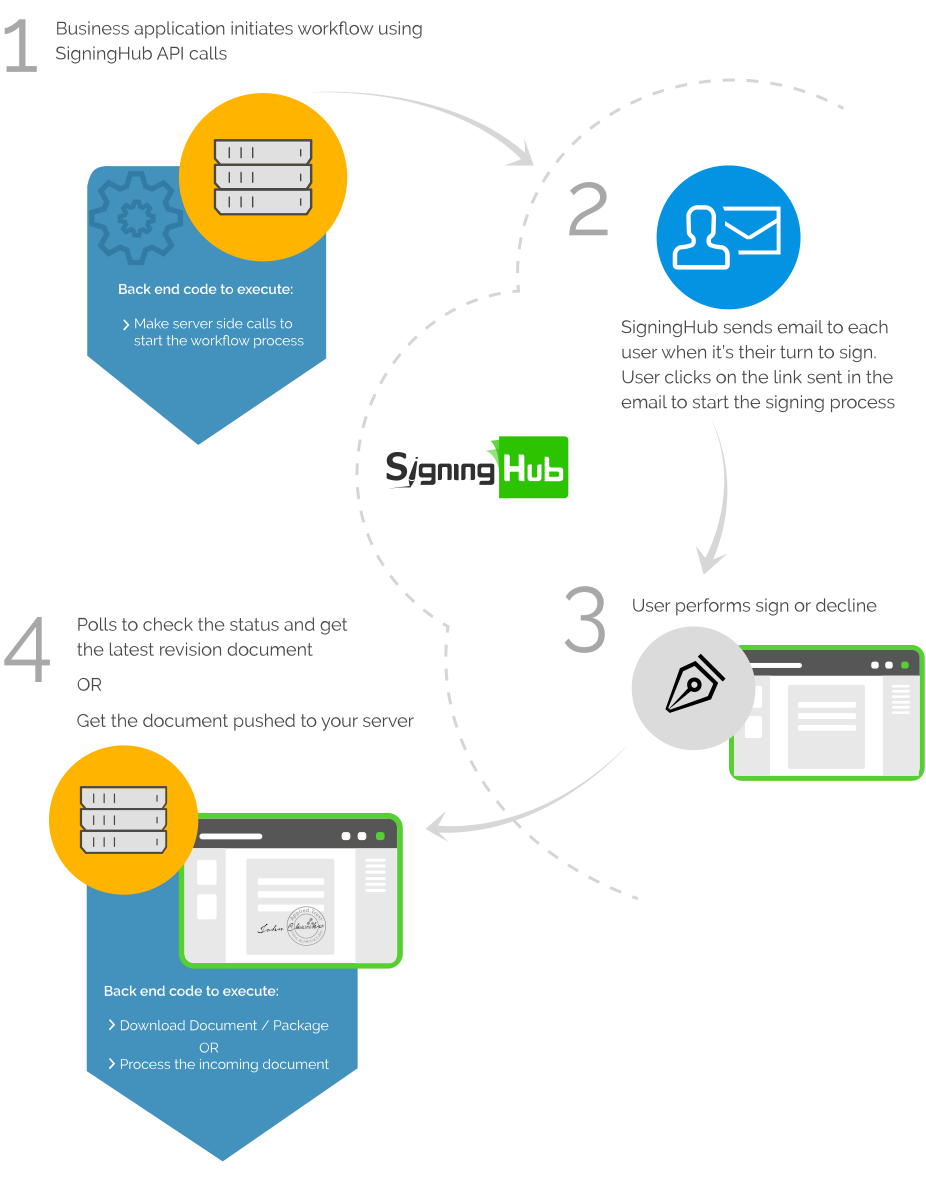
Users interact with the SigningHub web interface to review and sign documents. The workflow is initiated by your business application and control returned once the user completes their respective actions. This is useful in situations where external users are required to sign documents, but do not have access to your internal business application.
Mixed-mode integration
Both tight and loose modes of integration can be used together within one document workflow, so internal users are interacting with SigningHub through their own web application interface, whilst external users interact directly with SigningHub.



I adore SigningHub’s Salesforce integration for its simplicity, ease of use and practical pricing. As a Salesforce Consulting Partner I recommend solutions regularly and I will always recommend SigningHub as the first option for Electronic Signatures.

Craig Stretch
Director at CAScloud
I adore SigningHub’s Salesforce integration for its simplicity, ease of use and practical pricing. As a Salesforce Consulting Partner I recommend solutions regularly and I will always recommend SigningHub as the first option for Electronic Signatures.
Craig Stretch
Director at CAScloud
FAQs
Does SigningHub RESTful API use HTTP Response Codes?
SigningHub uses the following HTTP response codes in all requests. Consult individual methods in the reference manual for a complete listing specific to the call:
200 – OK: Request processed successfully.
400 – Bad Request: The request was not correctly formatted per the requirements.
401 – Unauthorized: Authentication failed or authorization to the resource is not permitted.
404 – Not Found: Resource requested does not exist.
Common response codes used are:
403 – Forbidden: Request processed successfully.
500 – Internal Server Error: Contact Ascertia: this should not happen. Sorry!
What is the common API Endpoint used in calls?
All resources are located under the “https://api.signinghub.com/” base URL. SigningHub authentication always uses the postfix “/authenticate”, whereas there are two versions of the API set. These are distinguished by using the postfix “/v2/” and “/v3” respectively. Version three of the API set requires SigningHub 7 or later. Ascertia recommends version 3 of the API set.
What HTTP Verbs does SigningHub support?
SigningHub uses standard HTTP Verbs as described here. Please make sure to use the correct verb for the requested resource:
GET: Request or retrieve information.
POST: Send data to create a new record or update a current one.
PUT: Update a current record.
DELETE: Remove a record from the server.
Are there any applications with which SigningHub is currently integrated?
Yes, you can use the SigningHub Apps to integrate with:
Salesforce
Microsoft SharePoint
Microsoft Word platforms
More integrations are underway. Contact us for more details.
I get errors during integration
Please ensure the following:
Read the scenarios details for either loose or tight integration.
Check the API Reference and code as per the expected input and output.
The OAuth token has not expired. Note that the token expires after 24 hours.
Ensure that the client account which is used in the authentication call has rights assigned to the Integration area. Check via Enterprise Settings > Roles > Enterprise Settings.
If you have checked the above, and are still experiencing problems, then send an email to the support team with the following details:
Describe the integration requirements
Explain reproducible steps
If SigningHub is deployed on-premise, then provide:
System Platform details
SigningHub software version
Database version and patch level
Product log files
How to generate API key for integration?
You can create as many API Keys as required for each individual integration. Click here for details.
How can I load SigningHub tight integration in my own language?
See the HTML form posting inside the tight integration. If you want to load SigningHub in your language then ensure you pass the correct language variable/information e.g. en-US, de-DE, etc. SigningHub supports 20+ languages.
Do you have a development SDK?
SigningHub offers a mobile SDK that allows custom mobile applications to use the same capabilities as the SigningHub mobile application. SigningHub also supports a rich RESTful API interface for business application integration that allows a lightweight integration process and removes dependencies on a local platform, language, and device support. Look at the Getting Started section to learn more about integration options.
Which development languages can I use to integrate with SigningHub?
SigningHub uses REST architectural style APIs (interfaces explained in the Developer Manual), and hence you can use any language to integrate e.g. PHP, Node.js, Django, Java etc. We provide samples in C# so you can explore them along with the raw requests/responses to help you implement the APIs in your chosen respective language.
How can I communicate with my on-premise SigningHub installation?
Simply change the base API URL to your own SigningHub instance whilst keeping the rest of the URL the same as documented, e.g. change SigningHub API to your own domain address so that your business application can authenticate to your own SigningHub after instance.
From: https://api.[domainaddress.com]/authenticate
To: https://api.mysigninghub.com/authenticate